 lsvih
47a7e50dea
lsvih
47a7e50dea
* Create hiding-data-in-an-image-image-steganography-using-python.md

* Update hiding-data-in-an-image-image-steganography-using-python.md
11 KiB
Hiding data in an image : Image Steganography using Python

Image Steganography using Python
Today the world is witnessing a data explosion like never before. The amount of data we produce every day is truly mind-boggling. The Forbes article “How Much Data Do We Create Every Day?” states that there are about 2.5 quintillion bytes of data created each day at our current pace, but that pace is only accelerating with the growth of the Internet of Things (IoT). Over the last two years alone 90 percent of the data in the world was generated. This is worth re-reading!
Data. In essence, the modern computing world revolves around this word. But just what is so intriguing about it? In today’s world, businesses have started realizing that data is power as it can potentially predict customer trends, increase sales, and push the organization to newer heights. With the fast pace advancement in technology and use of data for continuous innovation it has become our topmost priority to secure data. Data sharing is increasing as thousands of messages and data are being transmitted on the internet everyday from one place to another. The protection of data is the primary concern of the sender and it is really important that we encrypt our message in a secret way that only the receiver is able to understand.
In this article we will understand what is least significant bit steganography and how can we implement it using python.
What is Steganography?
Steganography is the process of hiding a secret message within a larger one in such a way that someone can not know the presence or contents of the hidden message. The purpose of Steganography is to maintain secret communication between two parties. Unlike cryptography, which conceals the contents of a secret message, steganography conceals the very fact that a message is communicated. Although steganography differs from cryptography, there are many analogies between the two, and some authors classify steganography as a form of cryptography since hidden communication is a type of secret message.
Advantage of using Steganography over Cryptography?
Up to now, cryptography has always had its ultimate role in protecting the secrecy between the sender and the intended receiver. However, nowadays steganography techniques are used increasingly besides cryptography to add more protective layers to the hidden data. The advantage of using steganography over cryptography alone is that the intended secret message does not attract attention to itself as an object of scrutiny. Plainly visible encrypted messages, no matter how unbreakable they are, arouse interest and may in themselves be incriminating in countries in which encryption is illegal. [1]
Types of Steganography
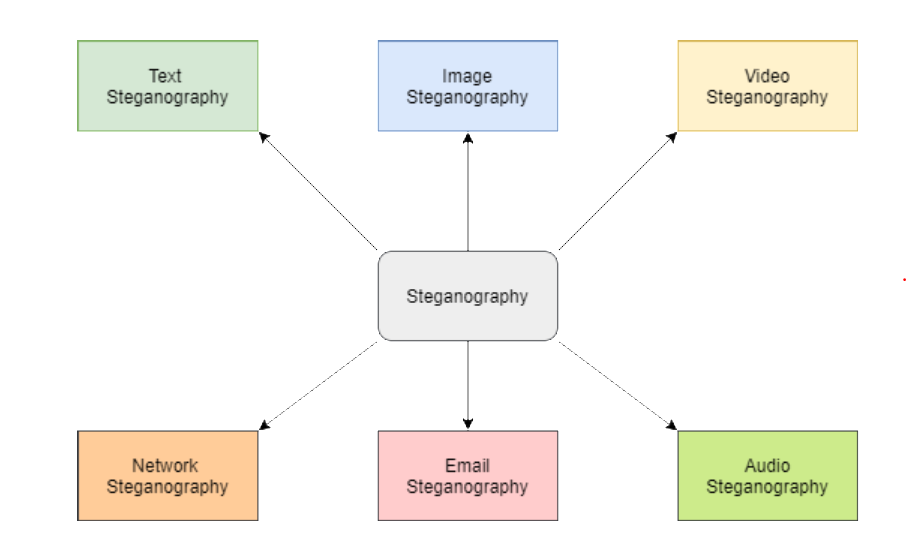
Steganography works have been carried out on different transmission media like images, video, text, or audio.
Basic Steganographic Model

As seen in the above image, both the original image file(X) and secret message (M) that needs to be hidden are fed into a steganographic encoder as input. Steganographic Encoder function, f(X,M,K) embeds the secret message into a cover image file by using techniques like least significant bit encoding. The resulting stego image looks very similar to your cover image file, with no visible changes. This completes encoding. To retrieve the secret message, stego object is fed into Steganographic Decoder.[3]
This article will help you to implement image steganography using Python. It will help you write a Python code to hide text messages using a technique called Least Significant Bit.
Least Significant Bit Steganography
We can describe a digital image as a finite set of digital values, called pixels. Pixels are the smallest individual element of an image, holding values that represent the brightness of a given color at any specific point. So we can think of an image as a matrix (or a two-dimensional array) of pixels which contains a fixed number of rows and columns.
Least Significant Bit (LSB) is a technique in which the last bit of each pixel is modified and replaced with the secret message’s data bit.


From the above image it is clear that, if we change MSB it will have a larger impact on the final value but if we change the LSB the impact on the final value is minimal, thus we use least significant bit steganography.
How LSB technique works?
Each pixel contains three values which are Red, Green, Blue, these values range from 0 to 255, in other words, they are 8-bit values. [4] Let’s take an example of how this technique works, suppose you want to hide the message “hi” into a 4x4 image which has the following pixel values:
[(225, 12, 99), (155, 2, 50), (99, 51, 15), (15, 55, 22),(155, 61, 87), (63, 30, 17), (1, 55, 19), (99, 81, 66),(219, 77, 91), (69, 39, 50), (18, 200, 33), (25, 54, 190)]
Using the ASCII Table, we can convert the secret message into decimal values and then into binary: **0110100 0110101.**Now, we iterate over the pixel values one by one, after converting them to binary, we replace each least significant bit with that message bits sequentially (e.g 225 is 11100001, we replace the last bit, the bit in the right (1) with the first data bit (0) and so on).This will only modify the pixel values by +1 or -1 which is not noticeable at all. The resulting pixel values after performing LSBS is as shown below:
[(224, 13, 99),(154, 3, 50),(98, 50, 15),(15, 54, 23),(154, 61, 87),(63, 30, 17),(1, 55, 19),(99, 81, 66),(219, 77, 91),(69, 39, 50),(18, 200, 33),(25, 54, 190)]
Hiding text inside an image using Python
In this section, we can find a step-by-step of the hide and reveal process using Python code. Open a google collab notebook and follow the steps below:
Before beginning with the code, you can upload the image(png) that you would like to use for steganography using the upload option that appears on the left hand side menu bar.

Step 1: Import all the required python libraries

Step 2: Define a function to convert any type of data into binary, we will use this to convert the secret data and pixel values to binary in the encoding and decoding phase.

Step 3: Write a function to hide secret message into the image by altering the LSB


Step 4: Define a function to decode the hidden message from the stego image

Step 5: Function that takes the input image name and secret message as input from user and calls hideData() to encode the message

Step 6: Create a function to ask user to enter the name of the image that needs to be decoded and call the showData() function to return the decoded message.

Step 7: Main Function()

Output/Results:
Encoding the message:

Decoding the message:

If you are interested in the code, you can find my notebook on Github.
References:
- https://towardsdatascience.com/steganography-hiding-an-image-inside-another-77ca66b2acb1
- https://www.edureka.co/blog/steganography-tutorial
- https://www.forbes.com/sites/bernardmarr/2018/05/21/how-much-data-do-we-create-every-day-the-mind-blowing-stats-everyone-should-read/#191d0b0160ba
- https://www.ukessays.com/essays/computer-science/steganography-uses-methods-tools-3250.php
- https://www.thepythoncode.com/article/hide-secret-data-in-images-using-steganography-python
- https://www.youtube.com/watch?v=xepNoHgNj0w&t=1922s
如果发现译文存在错误或其他需要改进的地方,欢迎到 掘金翻译计划 对译文进行修改并 PR,也可获得相应奖励积分。文章开头的 本文永久链接 即为本文在 GitHub 上的 MarkDown 链接。
掘金翻译计划 是一个翻译优质互联网技术文章的社区,文章来源为 掘金 上的英文分享文章。内容覆盖 Android、iOS、前端、后端、区块链、产品、设计、人工智能等领域,想要查看更多优质译文请持续关注 掘金翻译计划、官方微博、知乎专栏。